


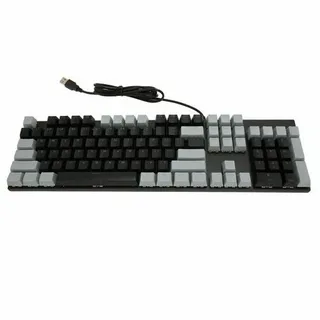
Choosing the right keyboard is more than just picking a device that types letters—it’s about comfort, efficiency, and long-term health for your hands and wrists. If you’re looking for a keyboard that suits your needs perfectly, understanding the different layouts is crucial. This guide will help you discover how to choose the best full size keyboard layout for you and make typing an effortless experience.
Understanding Full Size Keyboards
A full size keyboard typically includes all the alphanumeric keys, function keys, navigation keys, and a numeric keypad. Unlike compact keyboards, full size keyboards are ideal for professionals, gamers, and anyone who frequently works with numbers. Knowing the layout options is essential because it directly impacts typing speed, comfort, and productivity.
Standard QWERTY Layout
The most common layout is the QWERTY, designed for English typing. Its widespread adoption means compatibility with almost all software and minimal learning curve. If you prioritize familiarity and versatility, the QWERTY layout might be your best choice.
Alternative Layouts
There are other layouts like AZERTY, Dvorak, or Colemak, each with unique benefits:
- AZERTY: Common in French-speaking countries.
- Dvorak: Designed to increase typing speed and reduce finger movement.
- Colemak: Offers efficiency improvements without a steep learning curve.
If you type extensively or want ergonomic benefits, exploring these layouts can be worth your time.
Factors to Consider When Choosing a Full Size Keyboard Layout
When deciding how to choose the best full size keyboard layout for you, consider the following factors:
1. Typing Comfort and Ergonomics
Look for a layout that minimizes finger movement and strain. Ergonomic spacing and key shapes can significantly affect long-term comfort.
2. Usage Purpose
Gamers may prefer certain layouts for quicker access to function keys, while data entry professionals benefit from a numeric keypad. Understanding your primary use ensures your keyboard enhances your workflow.
3. Learning Curve
Switching to an alternative layout may require time to adjust. Consider whether you’re willing to invest in learning a new system or if sticking with a familiar layout makes more sense.
4. Compatibility
Ensure the keyboard layout works well with your operating system and preferred software. Some layouts might require additional configuration, especially if you choose less common options like Dvorak or Colemak.
Tips for Testing Before Buying
Before making a purchase, try typing on different full size keyboards if possible. Many stores offer display models, or you can use online simulators to practice layouts virtually. Testing allows you to gauge comfort, speed, and personal preference—crucial steps in learning how to choose the best full size keyboard layout for you.
Conclusion
Selecting the right keyboard layout goes beyond aesthetics; it impacts typing efficiency, comfort, and productivity. By understanding the differences between layouts, considering ergonomics, usage needs, and testing options, you can confidently decide on a keyboard that suits your lifestyle. Remember, knowing how to choose the best full size keyboard layout for you ensures every keystroke is comfortable and efficient, making your work or gaming experience far more enjoyable.
